Slow Roads





Rating:
4.47
Played:
51,876
What is Slow Roads?
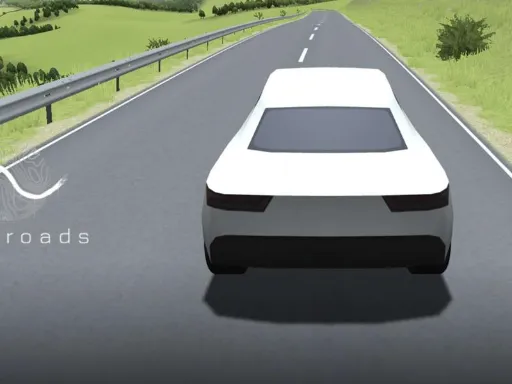
Slow Roads is a relaxing driving game where the main point is the journey, not the finish line. You roll forward on an endless road, watch the scenery change, and let your mind slow down. There are no races to win and no timers to beat—just a peaceful road trip you can start anytime.
At its core, Slow Roads is an “endless drive” experience. The road and landscapes are generated as you go, so you can keep driving toward the horizon without reaching a final map edge. This uses procedural generation, which means the world is created by rules instead of a single fixed track. The result is a steady flow of fresh views that still feel natural.
What makes it feel relaxing
Most driving games push speed and competition. This one does the opposite. You can take corners at your own pace and enjoy the view. If you want a quieter session, use headphones and lower the engine sound so the environment stands out.
What you can customize
Part of the fun is shaping the vibe. Many players adjust:
- Weather and lighting
- Time of day (headlights matter at night)
- Camera view and field of view
- Steering sensitivity
- Visual quality and audio levels
These options help the same drive feel fresh, whether you want bright sunshine or a moody foggy cruise.
Play Slow Roads in your browser
One of the best parts is that Slow Roads was built to run in a web browser as a 3D experience. That means no installs and no updates to manage. Open the game page, wait for it to load, and you’re driving.
How to start on trafficroad.net
To play Slow Roads on my site, go to https://trafficroad.net and launch the game there. Once it loads:
- Click into the game window so it can read your inputs.
- Adjust settings if you want a different vibe (camera, sound, scenery).
- Start driving and fine-tune as you go.
Because it’s browser-based, Slow Roads is great for quick sessions: lunch break, study break, or a calm wind-down.
Browser and device tips
If the game stutters, close extra tabs, lower visual quality, and try full-screen mode. If it still struggles, update your browser and disable heavy extensions for the game page (some blockers can interfere with loading).
How to control Slow Roads
Slow Roads is easy to learn. You can start driving in seconds, but you still have enough control to make the ride feel personal.
Keyboard controls
Common keyboard controls include:
- WASD or Arrow Keys: drive and steer
- Mouse: look around
- C: switch camera
- Q / E: change weather
- Shift: boost
- R: reset to the road
- H: headlights
- P: pause
These basics keep the focus on the scenery, not complicated mechanics.
Mobile controls
Slow Roads can also work on mobile, with touch controls supported. Performance depends on your phone or tablet, since 3D graphics can be heavy.
A simple way to enjoy the drive
There is no “right” way. In Slow Roads, you can drive slowly, take wide corners, or push faster and react to sharper turns. If you want more challenge, switch to a closer camera and drive at higher speed so every curve matters.
The origin of Slow Roads
Slow Roads began as a personal hobby project by a creator who goes by anslo, a creative developer interested in the space between design and computer science. The project started as an exploration of procedural scenery generation and browser-based 3D.
That origin explains why the experience feels different from a typical racing title. It is not trying to be a competitive sim. Instead, Slow Roads aims for the quiet freedom of driving forward with no pressure. The journey is scenic and configurable, with elements like seasons and weather that can be adjusted.
Common questions about Slow Roads
Is Slow Roads free?
Slow Roads is widely offered as a free-to-play browser game, which makes it easy to jump in and try.
Do I need to download anything?
No. Slow Roads is designed to run in the browser, so you can play directly on trafficroad.net.
Does Slow Roads have a goal?
Slow Roads is open-ended. There is no finish line, no mission list, and no “game over.” The goal is simply to enjoy the drive and the views.
Can I play offline?
This game typically needs an internet connection because it runs as a web experience.
Why won’t it load?
Common causes include unstable internet, a browser issue, or extensions that block game files. Try refreshing, clearing cache, or opening in a different browser.
Why is Slow Roads laggy?
It can push older devices. Close heavy apps, lower visual quality, update your browser, and use full-screen mode.
Can I change camera and weather?
Yes. Camera switching and weather changes are common ways players shape Slow Roads to match their mood.
What if it’s blocked at school or work?
Some networks block browser games. Try a different network, private mode, or mobile data.
Play Slow Roads on trafficroad.net
If you want a calm drive you can start in seconds, play Slow Roads on https://trafficroad.net. Whether you’re looking for a peaceful break, a background “focus” activity, or just a beautiful road to follow, Slow Roads is an easy way to breathe, drive, and reset—one curve at a time.



Comments
Loading comments…