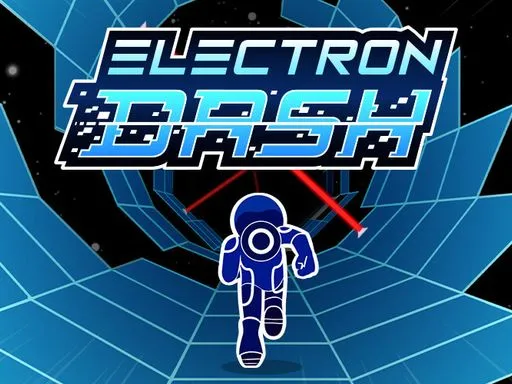
Electron Dash





Rating:
4.68
Played:
72,845
Electron Dash: What It Is and Why It Feels So Addictive
Electron Dash is a fast paced arcade runner set inside a glowing neon tunnel. You do not slowly explore or solve puzzles. You sprint forward automatically, react in real time, and try to survive as long as possible while the speed keeps rising. Most runs end in seconds at first, then you learn the rhythm and suddenly you are chasing one more point, one more clean jump, one more perfect rotation.
At its core, Electron Dash is about three skills. First, reading the tunnel ahead. Second, rotating the tunnel at the right moment so the safe path lines up under you. Third, timing jumps across gaps, weak tiles, and tight laser sections. The game keeps the rules simple, but it pushes your focus hard, which is why Electron Dash works so well for quick breaks and long high score sessions.
Play Electron Dash in Your Browser on trafficroad.net
If you want the simplest way to jump in, play Electron Dash on trafficroad.net. Since Electron Dash is built for browsers, you can start a run without installs, accounts, or extra setup in most modern devices.
Quick start checklist
- Open trafficroad.net in your browser.
- Find Electron Dash and press play.
- If your browser blocks sound at first, click once inside the game area and audio should work.
- Use fullscreen if you want clearer timing on jumps and lasers.
Electron Dash rewards clean visuals. A larger screen and steady frame rate make it easier to spot weak tiles and prepare rotations early. If you are on a laptop, closing heavy tabs can help keep Electron Dash smooth.
How Electron Dash Controls Work
Electron Dash feels intense, but the controls are easy to learn.
Keyboard controls
Most versions of Electron Dash use arrow keys or WASD for movement and a jump key like Space or Up. The key idea is that you are not steering left and right on a flat road. You are rotating the tunnel so the floor becomes safe again under your feet.
Mobile and touch controls
On phones or tablets, Electron Dash usually provides on screen controls. The gameplay goal stays the same: rotate the tunnel to line up platforms and tap jump to clear gaps.
Control tips that actually help
Look two steps ahead
In Electron Dash, staring at your character is a trap. Train your eyes to watch the next platforms and the next laser.
Rotate earlier than you think
Late rotations cause panic jumps. Early rotations create calm jumps.
Treat weak tiles as temporary
Some tiles collapse after you step on them. Cross them quickly and do not plan to stand still.
Where Electron Dash Comes From
Electron Dash is widely distributed as a web based arcade game using browser friendly tech such as HTML5 or WebGL. That is why it loads directly in a tab and works across many common browsers.
Credits for Electron Dash can vary depending on where it is hosted. Some public game listings credit MarketJS and place the release around 2018, while other listings show different publisher labels such as DQV Studio. The most important practical detail is that Electron Dash is designed to run instantly online, which is exactly why it fits well on trafficroad.net.
What Makes Electron Dash Different From Other Tunnel Runners
Electron Dash is not just about dodging. The rotating tunnel changes how you think. Instead of moving around obstacles on a flat lane, you rotate the whole world to make a safe lane appear.
It stays fresh with unpredictable patterns
Many versions of Electron Dash generate changing layouts so restarts do not feel identical. That randomness keeps you alert, because you cannot memorize one perfect path.
It has a simple survival system
Some builds of Electron Dash give you limited lives, and rare heart items can add an extra life. That creates exciting risk decisions: do you go for the heart near danger, or do you play safe and protect your run.
Common Questions About Electron Dash
Is Electron Dash free to play?
Yes. Electron Dash is commonly offered as a free browser game, which is why you can play Electron Dash on trafficroad.net without downloading anything.
Do I need a strong computer to play Electron Dash?
Not usually. Electron Dash is lightweight compared to big 3D games, but it still depends on smooth performance for tight jumps. If Electron Dash feels laggy, close other tabs, turn off heavy browser extensions, and try fullscreen.
Why does Electron Dash have no sound?
Many browsers block audio until you interact with the page. Click once inside Electron Dash, then sound should start.
The screen is black or the game will not load. What should I do?
Try these steps in order.
- Refresh the page on trafficroad.net.
- Turn off ad blockers just for the game page, then reload.
- Clear the site cache for trafficroad.net and restart the browser.
- Switch to another modern browser if the issue continues.
What are the main hazards in Electron Dash?
The most common threats are gaps, collapsing tiles, and laser beams. If you fall into a gap, the run ends. If you hit a laser, the run ends. The key is to rotate early and jump clean.
Can I play Electron Dash on a phone or tablet?
In many browser versions, yes. Electron Dash is often described as mobile friendly with touch controls, though a bigger screen can make timing easier.
How do I get a higher score in Electron Dash?
In Electron Dash, score is mainly about survival time and consistency. Focus on fewer mistakes, not risky moves. Once you can survive longer, you can start taking smart risks for hearts and cleaner lines through laser sections.
Play Electron Dash Now on trafficroad.net
Electron Dash is quick to learn, tough to master, and perfect when you want a real reflex challenge without a download. If you are ready to test your timing, rotation control, and focus, open trafficroad.net and play Electron Dash in your browser today.


Comments
Loading comments…